For most startups, building an office setup is all about balance. You need systems that are reliable enough to support growth, but flexible enough to avoid unnecessary spending. Printing is one of those areas where businesses often overspend early, either by buying too much equipment or investing in infrastructure they do not actually need.
The smarter approach is to build around one dependable device that can handle multiple functions efficiently. A High productivity laser printer can cover everyday printing, scanning, copying, and document sharing without the need for separate machines.
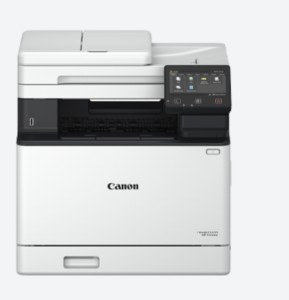
The MF752Cdw fits well into that kind of setup because it combines strong performance with practical features that make sense for small teams.
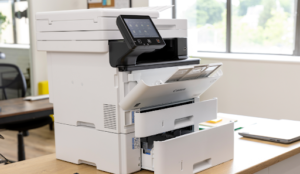
Prioritise Speed for Daily Operations
Speed is one of the first things that matters in a busy office. When multiple people are printing proposals, invoices, presentations, or internal documents, delays start adding up quickly.
With print speeds of up to 33 pages per minute in both mono and colour, the MF752Cdw keeps work moving without creating bottlenecks.
Make Scanning Faster and Simpler
Scanning is another area where startups can save time. Instead of feeding pages one by one, the printer comes with a 50-sheet single-pass duplex document feeder that can scan both sides of a page in one pass.
It also handles scan speeds of up to 100 images per minute in mono and 80 images per minute in colour, which makes a difference when teams need to digitise contracts, onboarding forms, or client records quickly.
Keep Connectivity Flexible
Connectivity is equally important in a modern office. Most startups work across laptops, phones, and shared devices, often without a fixed workstation for every employee.
A high productivity laser printer with wireless connectivity makes this much easier. The MF752Cdw supports Wi-Fi, Gigabit Ethernet, USB, and direct connection to mobile devices, so teams can print from almost anywhere in the office without needing additional hardware.
Reduce Operating Costs Over Time
Cost control is another big part of keeping office printing efficient. Automatic duplex printing helps reduce paper usage by printing on both sides of the page. Over time, that lowers operating costs without changing how people work.
The optional high-yield toner cartridge also helps reduce maintenance and replacement frequency, especially for startups with growing print volumes.
Build with Future Growth in Mind
As businesses expand, document security becomes more important too. Contracts, employee information, financial reports, and customer records all move through office printers.
Features like encrypted communication through TLS 1.3 and startup verification checks help protect sensitive information without needing a separate security system.
The MF752Cdw also gives businesses room to grow. Its paper capacity can be expanded up to 850 sheets, which means startups do not have to replace the device the moment printing needs increase.
A good office printing system does not need to be complicated or expensive. It just needs to work consistently, support the pace of the business, and remove friction from everyday tasks so the team can focus on building the company instead of managing equipment.