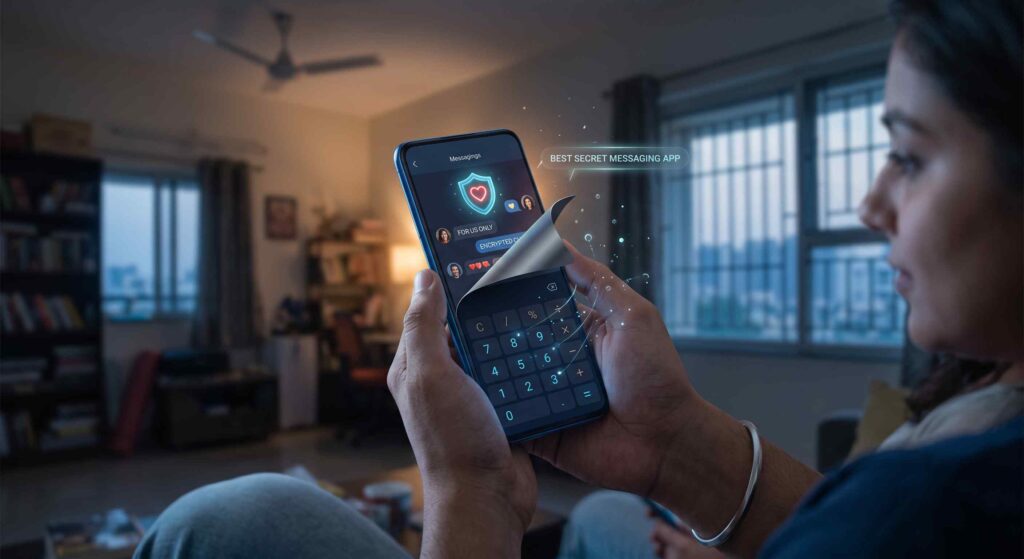
Imagine sitting across from a close friend at a neighborhood diner, catching up on life over tea, while your phone rests flat on the table between your plates. Suddenly, your display illuminates with an incoming message. Even if you have nothing scandalous to hide, that familiar instinct kicks in immediately: you reach out, flip the device face down, or slide it closer to your edge of the table. You might only be going over a monthly budget, talking through a career decision with a trusted mentor, or having a private moment with your partner. Yet, because modern mobile displays are built to be sharp, bright, and impossible to miss, keeping ordinary personal conversations to yourself feels like a nonstop defensive chore.
Most people try to solve this discomfort with heavy-handed locks. They install third-party app lockers, set up strict Face ID or fingerprint checks on their daily social apps, or bury sensitive messaging icons several folders deep inside system menus.
The fundamental flaw with visible security barriers is that they draw immediate curiosity. When a family member, roommate, or coworker borrows your handset to look up directions or check a recipe, tapping an ordinary messaging app only to be stopped by an aggressive passcode prompt triggers an instant reaction: “Why is this locked? Who are you texting that needs a password?” A visible lock does not prevent questions; it creates awkward tension out of thin air.
True screen privacy does not come from locking a visible door. It comes from making sure nobody ever suspects a communication platform is installed on your device in the first place. That is why choosing a dedicated Secret Messaging App like Disguise Chat completely transforms your day-to-day comfort by hiding your entire conversation workspace behind an ordinary, fully functional calculator.
Understanding the In-Person Privacy Problem
Every major messaging platform is engineered around continuous engagement, vivid branding, and constant push notifications. While that setup works fine for broadcasting memes or coordinating team meetings, it leaves you completely exposed in close physical quarters:
-
Distinct, colorful logos immediately announce to anyone looking over your shoulder which platforms you are actively using.
-
Pop-up lock screen banners can flash sender identities and preview snippets across a table, even while your device sits idle.
-
Traditional networks require your active cellular telephone number, permanently binding your conversations to your SIM card and real-world legal identity.
-
Passing your phone to an acquaintance to look at a photograph or place an urgent call always carries the risk of them opening your regular chat inboxes by accident.
While internet encryption protects messages as they travel across digital networks, it provides zero defense against someone sitting eighteen inches away and reading directly off your glass screen.
The Camouflage Solution: Introducing Disguise Chat
True screen defense does not mean placing an obvious lock over an ordinary chat app; it means ensuring that nobody ever suspects a communication platform is even installed on your device.
That is the foundation behind Disguise Chat.
Rather than displaying identifiable speech bubbles, unread counter badges, or security logos, Disguise Chat operates as an authentic Hidden Chatting App that looks, behaves, and launches as a regular, fully functional calculator.
To anyone scrolling through your installed apps, reviewing your multitasking drawer, or borrowing your handset, there are zero chat emblems or vault folders. It appears solely as an everyday mathematical utility that anyone can click without suspecting a thing.
Built-In Defenses of Disguise Chat
Disguise Chat is crafted specifically for users who need dependable screen discretion in shared homes, open workplaces, and social settings:
-
A Fully Working Everyday Calculator: Unlike poorly engineered vault apps featuring non-responsive interfaces or frozen screens, Disguise Chat works as a responsive, real calculator. You can run everyday math, tally expenses, and split bills effortlessly. If someone borrows your phone to calculate numbers, the app works smoothly without giving any hint that a chat platform exists underneath.
-
The Covert Numeric PIN Doorway: There are no suspicious login buttons, swipe gestures, or biometric pop-ups that alert onlookers. Your private chat workspace is unlocked only by typing your secret numeric PIN directly into the calculator keypad. The moment you enter your code, the calculator interface seamlessly opens your encrypted communication dashboard. If anyone else types random digits, it simply performs ordinary math.
-
Radical Anonymity with Zero Personal Data: Traditional messaging networks tie your account directly to your personal phone number, linking your chats to your SIM card and government identity. They also ask for permission to scan and upload your complete address book. As an independent Hidden Messaging App, Disguise Chat never asks for a telephone number, email address, or contact list access. You interact solely through an anonymous, randomly generated User ID, leaving no digital paper trail back to your name.
-
Anti-Coercion Defense via Panic Code: One of the most stressful situations occurs when someone corners you and insists that you unlock your phone on the spot. Refusing makes them angry, but revealing your chats could cause serious problems. Disguise Chat solves this with a built-in Panic Code:
-
You set up a secondary Panic PIN alongside your regular unlock PIN.
-
If forced to open the app under pressure, you type the Panic PIN into the calculator.
-
The app quietly and instantly wipes all local message history, photos, and active sessions.
-
No warning pop-ups or error screens appear. The display simply shows a standard calculator result, leaving zero trace of your chats on your device storage.
-
-
Instant Screen-Off Protection: If someone suddenly steps into your room or leans over your shoulder while you are typing, you never have to panic or scramble to hide your screen:
-
Locking your phone immediately locks the chat workspace.
-
Switching to another application returns Disguise Chat straight to calculator mode.
-
The app leaves no sensitive thumbnails or message previews in your phone’s recent apps carousel.
-
Separating Public Chatter From Your Inner Circle
Protecting your personal boundaries does not require you to abandon social media or delete your primary messaging accounts. The most practical strategy is maintaining two independent communication lanes on your phone.
Your primary public lane uses standard, recognizable messengers. You keep these apps right on your home screen for day-to-day office coordination, food delivery updates, community notices, and casual family threads. Whenever a friend or coworker asks to check a picture or make a call, you can hand your phone over without hesitation because these visible inboxes contain nothing sensitive.
Your private lane stays completely reserved for your personal thoughts through a dedicated Secure Private Messenger. This is where you discuss confidential plans, sensitive personal choices, and candid conversations. Because Disguise Chat functions behind an everyday calculator keypad, both lanes exist side by side on your phone without ever creating suspicion or awkward questions.
Enterprise-Grade End-to-End Encryption
Camouflaging an application shields your physical screen from snooping eyes nearby, but strong cryptographic defense remains essential while messages travel across the internet.
Disguise Chat pairs visual stealth with enterprise-level End-to-End Encryption (E2EE):
-
Every text, photo, and voice message is encrypted directly on your smartphone before transmission.
-
Decryption keys stay strictly on the user devices involved in the conversation.
-
Cellular providers, public Wi-Fi routers, and even the internal servers routing Disguise Chat cannot read or decode your messages.
Visual camouflage keeps your display safe from shoulder surfers, while strong encryption protects your communications across the broader web.
Getting Started in 4 Simple Steps
Setting up a truly private, stress-free communication channel takes less than two minutes:
-
Download the Application: Head over to Disguise Chat and download the app directly to your smartphone.
-
Configure Your Secret PIN: Open the calculator, choose your confidential access PIN, and set up your emergency Panic Code.
-
Share Your User ID: Exchange your randomly generated User ID with your trusted contact.
-
Chat with Complete Confidence: Message freely, knowing that closing the window instantly turns your screen back into a plain calculator.
Restore Natural Calm to Your Everyday Handset
Taking control of your conversation privacy is an ordinary, reasonable part of personal autonomy, not an admission that you have something to hide. Handing over your phone to share a funny clip or let someone look up driving directions should never come with a spike of anxiety over what might suddenly pop up across your display.
Conspicuous locks invite scrutiny, but true visual camouflage keeps you completely off the radar. By pairing device-to-device encryption with the disguise of an ordinary everyday calculator, choosing an authentic communication shield gives you complete ownership over your digital privacy.
Visit Disguise Chat today to protect your personal conversations from curious eyes.
Frequently Asked Questions (FAQs)
1. Does Disguise Chat really work like a normal calculator?
Yes. Disguise Chat is a real, working calculator. Anyone opening the app can perform basic arithmetic like addition, subtraction, multiplication, and division normally. The messaging dashboard only appears after your secret numeric PIN is entered into the calculator keypad.
2. Do I need to provide my phone number or email address?
No personal details are required. Disguise Chat does not ask for phone numbers, email addresses, or address book permissions. You are identified solely through a random, anonymous User ID.
3. What happens when the Panic Code is entered?
The Panic Code is a secondary emergency PIN. If someone forces you to unlock the app in front of them, entering this code instantly and quietly wipes your local message history, media, and active credentials, leaving only a normal calculator screen with zero trace of your chats.
4. How does the app safeguard messages across the internet?
Disguise Chat implements device-to-device end-to-end encryption. Your messages are scrambled directly on your device prior to sending and can only be decoded by the intended recipient. No third parties, network operators, or servers can read your communications.
5. How does Disguise Chat prevent notification leaks?
To ensure that curious onlookers cannot spot incoming alerts, Disguise Chat avoids conspicuous notification banners that display sender names or text previews on your lock screen, keeping your conversations completely unnoticed.