best practices for displaying live event lists to maximize engagement-webp
During a busy matchday, users may have dozens of sporting events competing for their attention. If a sportsbook makes it difficult to locate live matches, understand scores, or explore available markets, users may quickly lose interest. A sports betting app development company in USA must therefore focus on creating live event lists that are easy to scan, visually organized, and responsive to changing match conditions.
A well-designed event list helps users discover relevant competitions without unnecessary scrolling or confusing navigation. By presenting essential information, delivering timely updates, and offering intuitive filtering options, sportsbook operators can make the browsing experience more convenient and engaging.
Why Do Live Event Lists Matter for Sportsbook Engagement?
Live event lists are often the first place users look when they want to follow a match or explore available betting markets. Their design directly affects how easily users can find relevant events and move between different sections of a sportsbook.
Displaying too much information in a single view can overwhelm users. On the other hand, removing important details may force them to open multiple screens just to understand the current match situation.
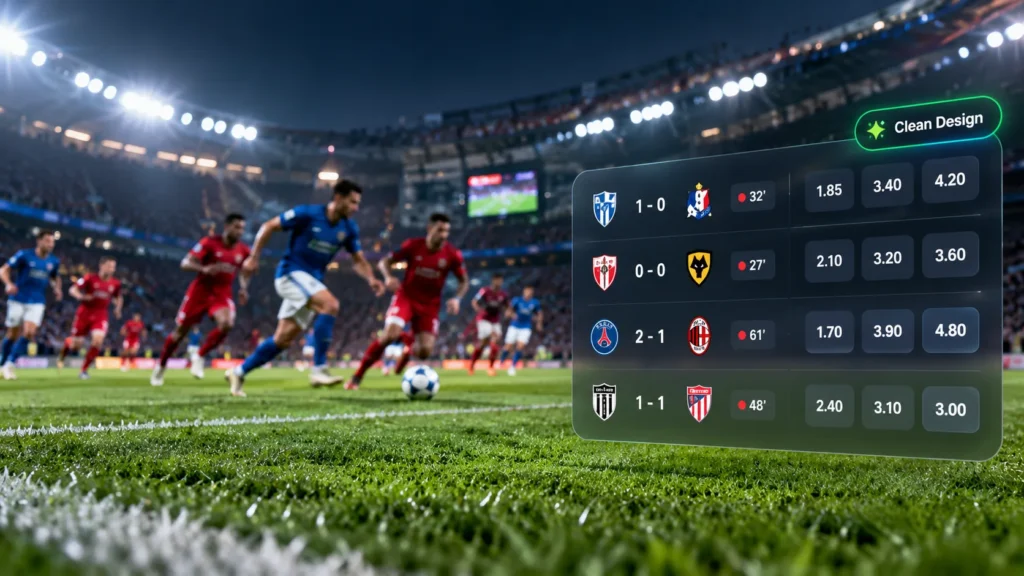
The ideal approach is to maintain a balance between simplicity and usefulness. A football event card might show the competing teams, current score, match minute, and selected odds. A cricket listing may prioritize the innings, current score, and over information. The layout should adapt to each sport while maintaining a familiar browsing experience.
How Should Live Sporting Events Be Organized?
A structured event list allows users to find matches quickly, even when several competitions are taking place simultaneously. Instead of presenting every fixture in one continuous feed, sportsbooks should organize listings into clear categories.
Sports, leagues, tournaments, and match statuses provide natural ways to group events. Separate sections for live matches, upcoming fixtures, and completed events can further simplify navigation.
Featured matches may appear near the top when they are relevant to the audience, while other competitions should remain easy to access. This approach prevents popular events from making smaller leagues unnecessarily difficult to discover.
An effective event card should include:
- Team or player names with recognizable logos where appropriate.
- Current scores and match status for ongoing events.
- Match time, period, set, or innings information.
- Scheduled start times for upcoming fixtures.
- Clear access to relevant betting markets.
Keeping these elements consistent helps users compare events without having to relearn the interface each time they browse a different sport.
How Can Real-Time Updates Keep Users Engaged?
Accurate, timely information is essential when users follow live sporting events. Outdated scores, incorrect match clocks, or delayed status changes can create confusion and reduce confidence in the platform.
Real-time technologies such as WebSockets and server-sent events can deliver updates without requiring users to refresh the page repeatedly. The interface can then update scores, match status, and other relevant information as new data becomes available.
However, every update does not need a prominent animation or notification. Important changes, such as a goal or a market suspension, should be noticeable, while routine score and clock updates can happen unobtrusively.
Sportsbooks should also account for data interruptions and delayed feeds. If information is temporarily unavailable, the interface should communicate the limitation instead of presenting old data as current. This helps maintain transparency and reduces confusion during fast-moving matches.
How Does Personalization Improve Event Discovery?
Not every user follows the same sports or competitions. Personalization can make event lists more useful by prioritizing the matches and leagues that matter most to each individual.
For example, users could save favorite teams, select preferred sports, or follow particular tournaments. The platform could then display these selections in a dedicated section, reducing the effort required to locate familiar events.
Recently viewed matches can also help users return to events they were following earlier. Sport-specific filters and adjustable preferences offer additional control over the browsing experience.
A practical personalization strategy may include:
- Favorite teams and competitions displayed prominently.
- Recently viewed matches for convenient access.
- Filters that remember user preferences where appropriate.
- Relevant event recommendations based on permitted activity and declared interests.
Personalization should complement rather than replace general event discovery. Users must still be able to explore other sports and competitions without unnecessary restrictions.
How Can Visual Design Reduce Cognitive Load?
A crowded interface makes it harder for users to distinguish important details. Strong visual hierarchy helps them recognize team names, scores, live indicators, and betting options at a glance.
Readable typography, consistent spacing, and clearly separated event cards make the interface easier to scan. Important information should receive greater visual emphasis, while secondary details should remain available without dominating the screen.
Color can help distinguish live events from upcoming fixtures, but it should be used consistently. Text labels and recognizable icons should support color-based indicators so that information remains understandable for users with different accessibility needs.
Mobile optimization is particularly important because event lists often contain several rows of information. Compact layouts, readable text, sufficiently large touch targets, and responsive controls make browsing easier on smaller screens.
Unnecessary animations, flashing elements, and excessive promotional banners should be avoided. A clean interface helps users focus on the sporting action and available information instead of competing visual distractions.
What Search and Filtering Features Should Be Included?
Even a well-organized event list can become difficult to navigate when hundreds of matches are available. Search and filtering features allow users to narrow the results and locate specific events more efficiently.
A search function should help users find teams, players, leagues, and tournaments. Filters can organize matches by sport, competition, live status, or scheduled start time.
The interface should clearly display active filters and provide a simple way to reset them. Where practical, selected filters should remain in place as users navigate between relevant screens.
Performance also matters. Search results should appear quickly, and applying filters should not trigger unnecessary page reloads. For large event inventories, incremental loading or pagination can help maintain responsiveness without overwhelming the device.
How Can Performance and Reliability Be Improved?
An attractive event list cannot deliver a good experience if it loads slowly or stops updating during popular matches. Sportsbooks need infrastructure that can handle sudden traffic increases, frequent data changes, and many concurrent users.
Developers can improve responsiveness by caching suitable information, reducing unnecessary network requests, and refreshing only the components that have changed. Monitoring tools can identify slow data delivery, rendering issues, and overloaded services.
Reliable data integration is equally important. When evaluating a sports betting api provider in USA, operators should assess supported sports, data accuracy, update frequency, service availability, and the handling of delayed or corrected results.
Useful performance and engagement metrics include event-card clicks, search usage, filter adoption, favorite-team interactions, page response times, and the time users need to locate a specific match. A/B testing can help determine which layouts improve usability without introducing unnecessary complexity.
Conclusion
Creating engaging live event lists requires a combination of clear organization, relevant personalization, accurate real-time updates, accessible visual design, and reliable technical performance. Users should be able to locate matches quickly and understand essential information without navigating through cluttered screens.
Sportsbook operators should prioritize simple event cards, intuitive filters, responsive layouts, and dependable data feeds. Regular testing and performance analysis can reveal where users encounter friction and which improvements deliver the greatest benefit.
Ultimately, the best live event list is not the one that displays the most information. It is the one that presents relevant details clearly, supports quick navigation, and makes discovering live sporting events a smooth and convenient experience.